



As of 2026, we have implemented a new membership and financial administration system called Banster.
This system offers a wide range of practical functionality for both our members and our organization. The main features are:
- Members/donors can view and update their own information (such as their address). They can also check the status of their invoices.
- Dutch members/donors can authorize automatic direct debit payments.
- Registration and payment for our events are also managed through this system.
- Our newsletter creation and distribution are handled via this system.
- Contact moments with each member or donor can be tracked. Of course, this information is only accessible to board members (who have all signed a confidentiality agreement).
- We maintain a central financial administration (not our general ledger) and have immediate insight and overview of invoices.
- The system operates on servers located in the Netherlands, which comply with European privacy regulations. Passwords are encrypted and cannot be viewed by administrators.
As soon as a member/donor registers via our website, they are linked to Banster. The actual registration takes place there, not on the website. Certain articles and parts of articles on our website, such as presentations, are intended for members only. This means that once a member is admitted in Banster, they also gain access to this restricted information on our website.
However, logging into our website requires a separate login.
When logging into Banster for the first time, please follow these steps:
 Open an internet browser and go to: Banster login.
- You will then see a page in both Dutch and English, with the login panel on the right-hand side.
- Banster uses a login and password system. You can request your login if you are registered as a member in Banster, using your email address. The login will be sent to that email address.
So select ‘Forgot your login’ and enter your email address (in case you are already a member of our organisation). You will receive via this email address your login name. - Using this login, you can securely request your own password. This password is generated by Banster and can be changed by you. Click on “Forgot password” and then enter your login and email address.
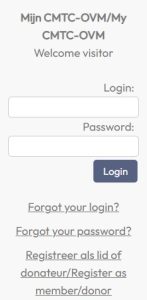 Open an internet browser and go to: Banster login.
Are you experiencing any problems or do you have any questions? Please contact us